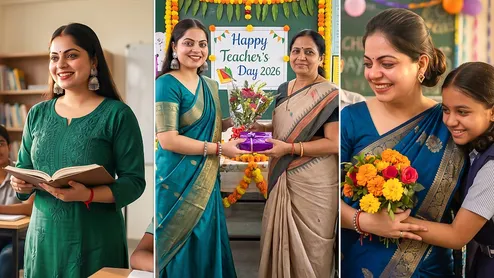
Teachers' Day 2026 is the perfect occasion to express gratitude to the educators who shaped our lives. With generative AI tools like Midjourney, Bing Image Creator, and ChatGPT, creating personalised, high-quality digital artwork with your favourite mentors has never been easier. Whether you want to recreate a nostalgic classroom moment, design a realistic photo frame, or craft a 3D avatar tribute, these 7+ tailored Teachers' Day AI prompts will help you generate stunning visual keepsakes in seconds.
7+ Google Gemini Photo Editing Prompts To Create Beautiful Teachers’ Day Photos
Here is a step-by-step guide on how to create Teachers’ Day AI photos for free, along with prompts to get you started.
Teachers’ Day 2026 AI Prompts: 7+ Google Gemini AI Photo Prompts
Convert this image as per this prompt: Create an ultra-realistic 8K Teacher’s Day 2026 photograph using my uploaded image. Preserve my original face and identity exactly as they are, without changing my eyes, nose, lips, ears, facial structure, skin texture or natural facial proportions. Dress me in an elegant traditional Indian outfit appropriate for my gender. Place me inside a beautifully decorated Indian classroom on Teacher’s Day, with marigold flowers, traditional torans, diyas and tasteful handmade decorations. Show my teacher standing beside me while I respectfully present a beautiful bouquet and gift to my teacher.
A cinematic, realistic Indian teacher standing confidently in a modern classroom, surrounded by attentive students, warm sunlight coming through windows, teacher holding a book, inspirational atmosphere, emotional expressions, premium education campaign style, realistic photography, elegant composition, depth of field, high detail, 16:9, no text
Heartwarming realistic scene of an Indian teacher helping a student understand a difficult concept, teacher smiling kindly, student looking inspired, classroom environment, soft golden lighting, emotional teacher-student connection, cinematic photography, natural human expressions, premium educational advertisement style, 16:9, no text
Realistic Indian teacher standing in front of diverse students, futuristic educational environment subtly blended with a traditional classroom, students visualised as future doctors, engineers, scientists and entrepreneurs, teacher proudly watching them, cinematic lighting, inspiring atmosphere, sophisticated advertising photography, 16:9, no text
Professional Indian female teacher in her early 30s standing in a bright modern classroom, wearing elegant formal Indian attire, holding a book and smiling naturally, students sitting in the background, warm sunlight, premium editorial photography, realistic skin texture, natural expressions, sophisticated composition, soft depth of field, 16:9, no text
Emotional, realistic Indian classroom scene inspired by nostalgic school memories, experienced teacher writing on a blackboard while students listen carefully, wooden desks, books, soft afternoon sunlight, subtle vintage atmosphere, emotional storytelling, cinematic photography, warm natural tones, highly realistic, 16:9, no text
Cinematic realistic composition showing an Indian teacher in the foreground and successful former students in the background represented as a doctor, engineer, scientist and civil servant, teacher looking proud, subtle graduation elements, inspirational atmosphere, dramatic studio lighting, premium education campaign visual, realistic Indian faces, 16:9, no text
Realistic joyful Indian classroom during Teachers’ Day celebration, students presenting flowers and handmade cards to their teacher, teacher smiling emotionally, beautiful classroom decorations, subtle balloons and flowers, warm golden lighting, candid human expressions, premium photography, vibrant but elegant composition, emotional storytelling, 16:9, no text
Teachers’ Day Photos Step-by-Step Guide
Step 1: Open Google Gemini in your web browser. Make sure you are logged in with your Google account.
Step 2: On the homepage, click on ‘New chat’ to start a new conversation.
Step 3: Now, this is the most important step. A good prompt should be a clear, detailed, and descriptive command. The more specific you are, the better the result will be.
Step 4: Hit ‘Enter’, and Gemini will generate a set of images for you. If you don't like the results, you can either edit your original prompt or ask Gemini to ‘regenerate’ them.
Image credits: Gemini
If you liked this story, then please share it. To read more such stories, stay connected to HerZindagi.