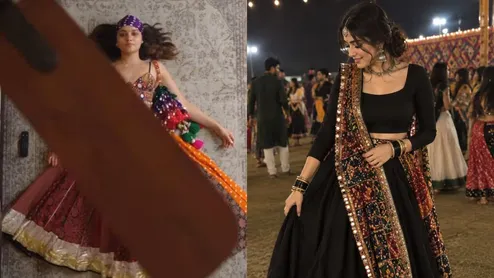
If you have been scrolling through Instagram and saw the viral fan outfit transition trend, then you are not alone. Every festive season, a new trend emerges on social media, and people are quick to hop on it. But this trend is quite tricky, and we are here to teach you how to make and edit this viral Navratri transition trend on Instagram. Here is a step by step guide.
Things required to shoot the viral Navratri reel:
- Phone or a good-quality camera.
- 4-5 outfits for Navratri and Garba, like different chaniya cholis and lehengas.
- Tripod / silicone sticky grip phone holder or a suction phone mount
- A good quality rug
You need two videos filmed from the exact same overhead position, and a tripod is a must.
Video 1 = Outfit 1 ( Casual)
Video 2 = Outfit 2 (White Chaniya Choli)
Video 3 = Outfit 3 (Red Garba Lehenga)
Video 4 = Outfit 4 (Glam Look with Jewellery)
Video 2 = Outfit 2 (White Chaniya Choli)
Video 3 = Outfit 3 (Red Garba Lehenga)
Video 4 = Outfit 4 (Glam Look with Jewellery)
How To Edit This Reel on InShot
Step 1: Create New Project
Open InShot, click on Video and New. Select Video 1 for Outfit 1. Set Canvas to 9:16
Step 2: Trim The First Transition Point
Play Video 1 and find the frame where the fan blade completely covers the camera. Split and keep the part till the fan covers the screen. Delete the rest.
Step 3: Add New Video
Add Outfit 2 With PIP. Tap on PIP from the bottom toolbar. Import Video 2 (Outfit 2). Drag the PIP clip to start exactly where Video 1 ends. Resize the PIP video to full screen and align the body position perfectly with Video 1
Step 4: Trim Outfit 2 For The Reveal
Trim Video 2 so it starts with the fan covering the camera and then moves away to reveal Outfit 2. This creates the illusion: Fan covers, then new outfit revealed.
Step 5: Repeat The Process
Repeat For Outfit 3 and Outfit 4. Again, tap PIP, add Video 3 (Outfit 3), and place it after Outfit 2 ends. Align the body position again and trim it to start with the fan covering and end with the fan covering for the next transition. Repeat the same process for Outfit 4.
This process can be repeated on any other editing app as well, like CapCut.
ALSO READ- How To Do Dhodhiya Garba: Step-By-Step Dance Guide For Beginners To Master The Traditional Steps
How To Shoot The Navratri Ceiling Fan Transition Reel
Set Up Your Camera
- Place the phone in a fixed position.
- Use the same framing throughout.
- Keep the camera pointed toward the ceiling fan.
- Avoid changing the camera height between shots.
Record Your First Look
- Wear your casual or simple outfit.
- Start recording.
- Position yourself consistently.
- Wait for the fan blade to move across the camera.
- Stop the recording when the blade covers the lens.
Change Into Your Navratri Look
- Change into your festive outfit.
- Keep the same lighting and camera position.
- Recreate your previous position as closely as possible.
Record The Reveal
- Start with the fan blade covering the camera.
- Let the blade move away.
- Reveal your complete Navratri look.
- Add a twirl, jewellery reveal, or garba pose at the end.
How To Make The Ceiling Fan Transition Look Seamless
- Keep the phone completely still.
- Maintain the same camera angle.
- Wear similar positioning in both clips.
- Match the fan's visual position at the cut.
- Keep lighting consistent.
- Avoid unnecessary filters.
- Cut precisely when the fan blade covers the lens.
- Sync the reveal with the music beat.
Here is your complete guide of how to create viral Navratri transition reel. Do tag Her Zindagi on Instagram and other socials to show us your rendition of this reel.
(Image Credits: Instagram, Pinterest)
To read more such stories, stay tuned to Her Zindagi.
To read more such stories, stay tuned to Her Zindagi.