5 Laptops Designed to Keep Up With Long Meetings, Tasks and Deadlines

The top laptops for long working hours need strong battery life, smooth multitasking and a comfortable keyboard. We know that finding the right model is crucial and here's a quick look at five laptops that handle back-to-back meetings, heavy tasks and tight deadlines without slowing down.

top_laptops_for_long_meetings_and_deadlines

Long workdays put a laptop in ways that can show you how your model really works. Back to back video calls, multiple tabs, spreadsheets and last-minute edits can drain a battery and slow it down by the end of the day and if your laptop fails to keep up with your schedule, the problem is often the hardware. This list examines five laptops designed for individuals who spend their days in meetings and constantly chase deadlines. Each one balances battery life, RAM, storage and comfort for long hours of typing and video calls. If you travel often or work heavily at a desk these picks cover different needs without compromising on speed. Check out the prime laptops for long working hours below.

What Features To Look For In A Laptop For Long Working Hours?

What you do when you invest a huge amount in something is consider its features. 

  • So, before buying, the best laptop feature that survives a packed workday is battery life. This will last beyond six hours without charging and is the first thing worth checking.
  • RAM is the second most important feature that matters a lot. For someone managing video calls, browser tabs and documents at once, 16GB feels like the perfect starting point, with 8GB often falling short because now the work is heavier. 
  • Also, storage comes next which can handle large files, recorded calls, and offline backups that pile up fast, so an SSD with enough space saves you from constant cleanup. 
  • Over an eight-hour period, a laptop with a stable trackpad and a comfortable keyboard makes a significant difference. 

These trendy laptops cover different work styles, from frequent flyers who need top laptops for travel to desk-bound professionals who need top laptops for long meetings without battery issues.

For More Such Articles, Refer To Our Gadget Zone.

Loading...

Vetted Options

Every product we recommend is carefully selected through a thoughtful blend of primary research and in-depth analysis of trusted sources.

  • Anti-Glare Coating

    HP 15 Smartchoice Laptop

    Why Should People Choose HP 15 Smartchoice?

    If you mostly deal with browser tabs, documents and the occasional video call, this laptop will cover the basics without any hassle. Because we have the Intel Core i3 processor that will run cool through most of the day, and the 512GB SSD means you won't run out of room for downloads, project files or that backlog of screenshots. 

    What stands out here is the anti-glare FHD screen, which actually helps during long afternoon sessions near a window. This helps, as whenever you do heavy or long-hour work, the screen will feel comfortable. 

    Someone who needs one of the best laptops for long working hours at a desk or in short meetings, it is the right choice. Lastly, it has high RAM that can easily handle multitasking decently, though power users juggling fifteen tabs alongside Excel might feel it slows down a touch.

    Specifications:

    • Brand HP
    • Model HP Laptop fd0573TU
    • Colour Natural Silver
    • Warranty 1 Year Manufacturer Warranty
    • ASIN B0F4R3GFMQ

    Reasons to buy:

    Anti-glare screen

    Lightweight build

    Reason to avoid:

    RAM could feel tight for heavy multitaskers

    01
  • HD Audio

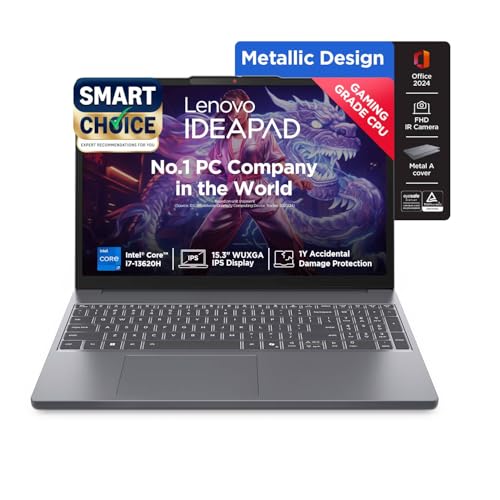
    Lenovo Ideapad Slim 3 Laptop

    Why Should People Choose the Lenovo Ideapad Slim 3?

    This ideal laptop comes with an i7 processor that is paired with 16 GB RAM. This will give real power that is backed up for back-to-back video calls, spreadsheets and browser-heavy research, all running together without lag.

    What I liked most is the battery claim of around 50 hours on light use which sounds too high until you realise this is genuinely one of the best laptops for travel if you forget to carry a charger everywhere. The 15.3 inch display is sharper than most laptops in this segment, and the backlit keyboard makes late evening work less of a strain on the eyes.

    It leans more toward productivity than gaming, so if that's your priority, look at another model from this list.

    Specifications:

    • Brand Lenovo
    • Model IdeaPad Slim 3 (83K100CJIN/S1IN)
    • Warranty 1 Year On-Site Warranty
    • Colour Luna Grey
    • ASIN B0F2162VGQ

    Reasons to buy:

    Long battery backup

    Sharp display

    Reason to avoid:

    May not suit dedicated gaming needs

    02
  • Our Core Values

    Transparent, Honest Reviews

    We provide straightforward insights into each product's strengths and weaknesses, so you can make confident, informed decisions.

    Trusted Brands Priority

    We focus on products from reliable brands known for quality, consistency, and customer satisfaction.

    Smarter Value for Your Money

    We highlight products that strike the perfect balance between cost, quality, and performance, so you get true value without the extra cost.

  • Fingerprint Reader

    Samsung Galaxy Book5 360

    Why Should People Choose the Samsung Galaxy Book5 360 Laptop?

    This is the kind of laptop you buy when you want something that does a bit of everything well. The 2 in 1 AMOLED touchscreen alone changes how it feels to use whether you are sketching notes with the included S Pen or just watching the screen flip into tablet mode during a quick break.

    Also, it has an Intel Core Ultra 7 chip with built in AI features which quietly speeds up everyday tasks like photo editing and background noise cancellation on calls. With Wi-Fi 7 support and two Thunderbolt 4 ports this also ranks among the best-rated laptops for anyone wanting future-ready connectivity. Battery life will fit around 68.1 Wh which is comfortable for a full day out.

    Specifications:

    • Brand Samsung
    • ModelGalaxy Book5 360
    • Colour Grey
    • Warranty 1 Year Manufacturer Warranty
    • ASIN B0DY79DQQ5

    Reasons to buy:

    AMOLED touchscreen

    Wi-Fi 7 support

    Reason to avoid:

    May not suit budget-conscious buyers

    03
  • Backlit Keyboard

    Dell G15 Laptop

    Why Should People Choose the Dell G15 Laptop?

    Let's be honest, this laptop can easily handle multiple tasks, spreadsheets and browsing. It has the NVIDIA RTX with 6 GB memory paired which can fit in your workflow. Due to its 120Hz display, it is one of the top laptops for heavy gaming without a heavy price tag. 

    What I appreciate is that Dell didn't compromise on storage, as a full 1TB SSD means game installs, recorded matches and work files can coexist without constant deleting, something that smaller SSD laptops cannot match. The backlit keyboard with a dedicated G-key adds a nice touch for late-night sessions.

    This model is the right choice for people who want to manage their heavy work and is also perfect for people who love to play games. So, if you are thinking of upgrading your workflow, this option is worthy. 

    Explore more from HZ Your Picks

    Specifications:

    • Brand Dell
    • Model Dell Laptop G15
    • Colour Dark Shadow Grey
    • Warranty 1 Year Onsite Service
    • ASIN B0CRKXDX83

    Reasons to buy:

    Dedicated RTX graphics

    Large storage

    Reason to avoid:

    Could feel heavy for daily carry

    04
  • 60 Hz refresh rate

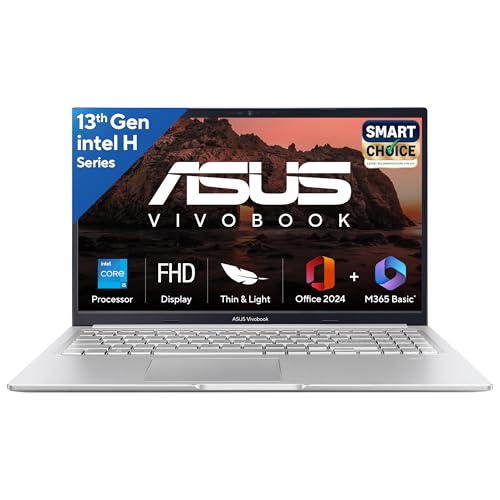
    ASUS Vivobook 15 Smart Choice Laptop

    Why Should People Choose the ASUS Vivobook 15 Laptop?

    • This Vivobook will be the one that can strike a balance for someone stuck in calls half the day and finish reports the other half of the day. 
    • It comes with core i5 processor with 8 cores that handles that kind of switching without much complaint, and 16 GB RAM is honestly perfect for high-RAM laptops in this price range.
    • A small detail worth mentioning: the battery is rated around 17 hours, which is unusually generous for a laptop this size, and in regular use, it does hold up reasonably well across a full workday. 
    • The ErgoSense keyboard also feels more comfortable than expected during longer typing stretches, something you will notice if you are one of those who top the laptop for long meetings, looking for keyboard comfort.

    Specifications:

    • Brand ASUS
    • Model ASUS Vivobook 15
    • Colour Cool Silver
    • Warranty 1 Year Global + Onsite Warranty
    • ASIN B0DTYHD5D1

    Reasons to buy:

    Long battery life

    Comfortable keyboard

    Reason to avoid:

    Screen refresh rate may not impress everyone

    05

A Quick Checklist Before You Buy High-End Laptops:

  • Confirm battery life under real use
  • Pick 16GB RAM or higher if you multitask often
  • Look for large-storage laptops if you save recordings or heavy files
  • Test the keyboard and trackpad, if possible, before buying

Note: From personal experience, the difference between a laptop that survives a 9-hour workday and one that doesn't usually comes down to battery performance and RAM, not just the price tag or design.

Read more:

Disclaimer: At Her Zindagi Your Picks, we prioritize providing up-to-date information on the latest trending commodities and goods. Links in this article are affiliate links. Please note that our product recommendations are based on independent research and analysis however, Her Zindagi Your Picks shall not be held liable for any claims, damages, or disputes arising under applicable laws, including the Consumer Protection Act, 2019. Any issues regarding product quality, delivery, or warranties must be directed to the respective manufacturer or seller. Furthermore, the products featured in this article are organized for reader convenience and are listed in no particular order of priority or ranking.

Faq's

  • Which laptop has the best battery life for long workdays?
    The Apple MacBook Air M2 leads this list with battery life that can stretch close to 18 hours on regular use.
  • How much RAM is enough for multitasking during long meetings?
    16GB RAM is a safe starting point for smooth multitasking, though heavy users may prefer 32GB like the ThinkPad X1 Carbon offers.
  • Are these laptops good for travel as well as office work?
    Yes, models like the Dell XPS 13 and HP Spectre x360 are lightweight and built to handle both travel and long office hours comfortably.

Loading...

Loading...