5 Best XP Pen Tablets (December 2025): Top Picks for Digital Artists & Designers

Discover the best XP Pen tablets for December 2025. From beginner-friendly graphics pads to professional display monitors, find the perfect digital art tool for your workflow.

best XP Pen tablet

Digital art has evolved rapidly, and having the right tools is no longer a luxury—it is a necessity. As we close out 2025, XP-Pen continues to dominate the market by offering premium features at accessible price points, challenging competitors with higher pressure sensitivity and innovative designs. Whether you are a 3D sculptor, a digital painter, gamer, the precision of your stylus can define the quality of your work.

Here we have com up with the best 5 XP-Pen tablets. We have analyzed specs, ergonomics, and performance to help you navigate the options. From the compact Star series to the feature-rich Artist display monitors, these selections represent the best balance of performance and value for creators of all levels.

Detailed Reviews: The Best XP-Pen Tablets for Every Budget

Navigating the technical specifications of digital tablets can be overwhelming, especially with the rapid upgrades seen in late 2025. To simplify your search, we have come up with the top 5 models based on critical factors like pressure sensitivity, active area size, and price-to-performance ratio. Below, you will find a deep dive into each device, highlighting its specific strengths to help you match the right tool to your unique artistic workflow.

Loading...

  • Loading...

    XP-Pen Deco01 V3 Digital Graphics Drawing Pen Tablet

    Loading...

    The Deco01 V3 stands out as a workhorse for artists who crave a traditional pen-and-tablet feel with modern specifications. Boasting a massive 10 x 6.25-inch active area, it provides ample room for sweeping arm movements, which is essential for ergonomic drawing and avoiding wrist strain. The standout feature in this V3 update is the industry-leading 16,384 levels of pressure sensitivity. 

    The tablet remains ultra-slim at just 8mm, making it portable despite its large workspace. It features eight customizable express keys that fit naturally under your fingers, allowing you to map shortcuts like "Undo" or "Brush Size" to streamline your workflow. The battery-free stylus supports up to 60 degrees of tilt, ensuring that shading feels natural and intuitive.

    Amazon User Reviews:

    Users frequently praise the V3 for its significant pressure sensitivity upgrade over previous models, noting the smooth lines and lack of lag. Some users mentioned it takes a few days to get used to the size if coming from a smaller pad.

    Suitable for: Illustrators and concept artists who need a large canvas and high precision without a built-in screen.

    Specifications:

    • Brand:XP-Pen
    • Connectivity Technology:USB
    • Pressure Sensitivity:8192 Levels
    • Operating System:Android 6.0 Marshmallow
    • Colour:Black
    • Warranty:1 Year Replacement Manufacturer
    • Dimensions:35.1L x 21.7W Centimeters
    • Model:Deco
    • Manufacturer:Hanvon Ugee Technology Co. Ltd. Address: No. 4 Building, Fulongte Industrial Park, Huaxing Road, Dalang Street, Longhua District, Shenzhen, China 518019, XP-Pen
    • Customer Reviews:4.4 out of 5 stars
    • ASIN:B077P6BQP7
    • Country of Origin:China

    Reasons to buy:

    Massive 16,384 pressure levels for superior accuracy.

    Large active area offers great value for the price.

    Lighted corners allow for usage in dim environments

    Reason to avoid:

    The large footprint may be too big for cluttered or small desks.

    01

    Loading...

  • Loading...

    XP-Pen StarG640 Graphics Drawing Tablet Pen Tablet

    Loading...

    The XP Pen tablet with StarG640 series is the definition of "small but mighty." Designed with a compact 6x4 inch working area, it is incredibly lightweight and thin, easily slipping into a laptop bag or backpack. This makes it responsive enough for sketching, photo editing, and digital signatures. 

    This specific model has gained a cult following in the rhythm game community, specifically for OSU!, because of its high report rate and battery-free stylus that requires no charging. For artists, it serves as an excellent secondary tablet for travel or a primary device for beginners who find large tablets intimidating. The plug-and-play nature means less time fiddling with drivers and more time creating.

    Amazon User Reviews:

    Gamers love the responsiveness and durability for high-speed gameplay. Artists appreciate it as a starter device, though some admit they eventually upgraded to a larger size for serious drawing.

    Suitable for: Beginners, OSU! gamers, and travelers needing a lightweight device for photo editing or signatures.


    Explore more in the gadget zone

    Specifications:

    • Brand:XP-Pen
    • Connectivity Technology:USB
    • Pressure Sensitivity:8192 Levels
    • Operating System:Mac OS, Windows
    • Colour:Black
    • Warranty:1 year manufacturer
    • Dimensions:16.2L x 8W Centimeters
    • Model:Star
    • Manufacturer:Hanvon Ugee Technology Co. Ltd. Address: No. 4 Building, Fulongte Industrial Park, Huaxing Road, Dalang Street, Longhua District, Shenzhen, China 518019, XP-Pen
    • Customer Reviews:4.2 out of 5 stars
    • ASIN:B078YNBFXG
    • Country of Origin:China

    Reasons to buy:

    Extremely affordable and budget-friendly.

    Compact and ultra-portable; perfect for limited desk space.

    High report rate makes it the top choice for OSU! gameplay.

    Reason to avoid:

    Lacks shortcut keys, forcing users to rely on a keyboard.

    02

    Loading...

  • Loading...

    XPPen Updated Deco Mini7 V2 Drawing Tablet-16384 Levels of Pressure Battery-Free Stylus

    Loading...

    The Updated Deco Mini7 V2 bridges the gap between portability and professional power. While it maintains a travel-friendly 7x4 inch size, it packs a surprising punch with the upgraded 16,384 levels of pressure sensitivity. This is a rare feature for tablets in this size class, giving mobile artists access to high-end line control without the bulk. It connects easily to Chrome OS, Windows, Mac, and Android, making it a versatile hub for digital art, teaching, or remote work.

    The device features eight round, customizable hotkeys that are tactile and easy to distinguish by touch. This customization allows users to replace their keyboard for common tasks, creating a self-contained workflow. The battery-free stylus is lightweight and precise, capable of handling detailed linework despite the smaller surface area. 

    Amazon User Reviews:

    Buyers are impressed by the pressure curve, stating it feels much more expensive than it is. Teachers specifically highlight its compatibility with Zoom and whiteboard apps as a major plus.

    Suitable for: Students, digital nomads, and teachers who need professional specs in a portable package.

    Specifications:

    • Brand:XP-Pen
    • Connectivity Technology:USB
    • Pressure Sensitivity:8192 Levels
    • Operating System:Android 6.0 Marshmallow, MAC OS 10.10, Windows 10, Windows 7, Windows 8
    • Special Feature:60° Tilt Support, Electromagnetic Resonance, Extra-Slim, Programmable Press Key, Shortcut Key
    • Colour:Black
    • Warranty:1 Year Replacement Warranty
    • Dimensions:26L x 16.2W Centimeters
    • Model:Deco Mini 7
    • Manufacturer:Hanvon Ugee Technology Co. Ltd. Address: No. 4 Building, Fulongte Industrial Park, Huaxing Road, Dalang Street, Longhua District, Shenzhen, China 518019, XP-PEN
    • Customer Reviews:4.3 out of 5 stars
    • ASIN:B08GLTSGQ9
    • Country of Origin:China

    Reasons to buy:

    Incredible 16K pressure sensitivity in a portable form factor.

    8 customizable hotkeys improve efficiency significantly.

    Versatile compatibility, including Chrome OS and Android.

    Reason to avoid:

    The 7x4 inch area might still feel restrictive for wide-stroke painting.

    03

    Loading...

  • Loading...

    Xp-Pen Deco Pro Medium Graphics Drawing Tablet

    Loading...

    The xp Pen Deco Pro Medium is a winner of the Red Dot Design Award, and it is easy to see why. It features a premium aluminum casing that feels durable and sleek, a departure from the plastic build of cheaper models. Its standout feature is the groundbreaking double-wheel interface—a physical mechanical wheel combined with a virtual touch pad. This allows you to adjust brush size, zoom, or scroll simultaneously with one hand while drawing with the other.

    With an 11x6 inch active area, it offers a wide workspace that maps perfectly to modern monitors. It supports 8192 levels of pressure and 60 degrees of tilt, ensuring professional-grade performance. The tablet also supports connection with Android phones and tablets, and the ultra-thin 7mm profile includes a curved wrist rest for ergonomic comfort during long studio sessions.

    Amazon User Reviews:

    Reviews consistently mention the "premium feel" and the utility of the dial wheels. Many users claim the control dial changed how they work, reducing their reliance on keyboard shortcuts.

    Suitable for: Professional designers and illustrators who prioritize workflow efficiency and build quality.

    Specifications:

    • Brand:XP-Pen
    • Connectivity Technology:USB
    • Pressure Sensitivity:8192 Levels
    • Operating System:Android,Mac Os,Windows 7
    • Special Feature:60° Tilt Support, 8192 Levels of Pressure Sensitivity, Shortcut Key
    • Colour:Black
    • Warranty:1 year manufacturer
    • Dimensions:39.9L x 22.7W Centimeters
    • Model:DecoPro
    • Manufacturer:Hanvon Ugee Technology Co. Ltd., XP-Pen
    • Customer Reviews:4.4 out of 5 stars
    • ASIN:B07XTKV3WQ
    • Country of Origin:China

    Reasons to buy:

    Premium aluminum build quality feels robust and professional.

    Innovative double-wheel interface dramatically speeds up workflow.

    Large workspace with a curved edge for wrist comfort.

    Reason to avoid:

    The mechanical wheel can collect dust over time if not cleaned.

    04

    Loading...

  • Loading...

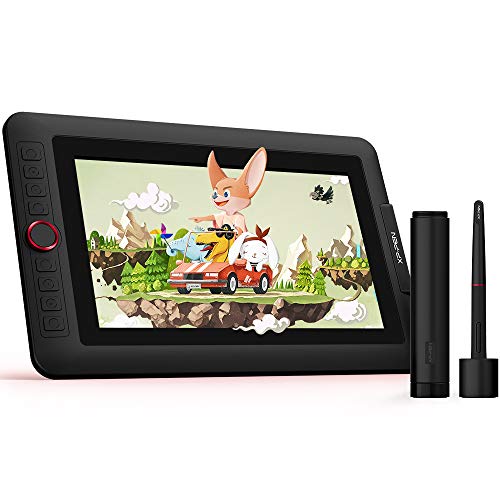
    Xp-Pen Artist 12 Pro 12 Inch Drawing Monitor Pen Display Full-Laminated Graphics Drawing Tablet

    Loading...

    The Artist 12 Pro is the perfect entry point into the world of pen displays, where you draw directly on the screen. It features an 11.6-inch IPS display with fully laminated technology. This lamination eliminates the air gap between the glass and the screen, virtually removing parallax (the distance between the pen tip and the cursor) and providing a "paper-like" viewing experience.

    The device includes XP-Pen’s signature Red Dial interface, a smooth-rotating wheel that offers precise control over canvas rotation and zooming. Combined with 8 customizable express keys and a battery-free stylus with tilt support, it offers a complete studio experience. The screen covers 72% NTSC color gamut, delivering vibrant and accurate colors essential for color grading and painting. It is powered via a convenient 3-in-1 cable, reducing cable clutter on your desk.

    Specifications:

    • Brand:XP-Pen
    • Connectivity Technology:USB
    • Pressure Sensitivity:8192 Levels
    • Operating System:Windows, MacOS and ChromeOS
    • Special Feature:Anti-Glare Glass, Portable
    • Colour:Black
    • Warranty:1 Year Replacement Warranty
    • Dimensions:35.5L x 23W Centimeters
    • Model:Xp-Pen Artist 12 Pro
    • Manufacturer:XP-Pen
    • Customer Reviews:4.4 out of 5 stars
    • ASIN:B0BCG36K4P
    • Country of Origin:India

    Reasons to buy:

    Drawing directly on the screen is intuitive for beginners and pros alike.

    Fully laminated screen minimizes parallax for precise strokes.

    The Red Dial is highly praised for its tactile control.

    Reason to avoid:

    Requires a connection to a computer/laptop (it is not a standalone tablet).

    05

    Loading...

Feature Comparison of Best XP-Pen Tablets

Model

Active Area / Screen

Pressure Levels

Key Feature

Best For

Deco01 V3

10" x 6.25"

16,384

Massive Area & Sensitivity

Digital Painting

StarG640

6" x 4"

8,192

High Report Rate

OSU! Gaming & Beginners

Deco Mini7 V2

7" x 4"

16,384

16K Pressure + Portability

Students & Travelers

Deco Pro Medium

11" x 6"

8,192

Dual Wheel Interface

Workflow Efficiency

Artist 12 Pro

11.6" Display

8,192

Fully Laminated Screen

Direct-to-Screen Drawing

Conclusion

Choosing the right drawing tablet ultimately comes down to your personal workflow and budget. Whether you opt for the budget-friendly StarG640 or the feature-packed Artist 12 Pro, XP-Pen’s 2025 lineup ensures that high-quality digital tools are accessible to everyone. Remember, the best tablet is the one that feels comfortable enough to use every day. 

Read More: Best 5g Tablets Under 15000

Disclaimer: At HerZindagi, we prioritize providing the up-to-date information on the latest trending commodities and goods. This Article is written and vetted by our in-house category authors in sync with the Google guidelines on product reviews and shoppable content. HerZindagi is in an associate partnership, so we may earn a part of the revenue when you make a purchase. We shall not be liable for any claim under applicable laws, including but not limited to the Consumer Protection Act, 2019, concerning the products. The products listed in this article are in no particular order of priority.

Loading...

Loading...

Faq's

  • Which XP-Pen tablet is best for beginners?
    +
    For absolute beginners, the StarG640 is the most cost-effective choice to learn hand-eye coordination. However, if you are serious about art and have a slightly higher budget, the Deco01 V3 offers a much larger workspace and better pressure sensitivity, which will serve you better in the long run as you improve.
  • Do I need a computer to use XP-Pen tablets?
    +
    Yes, generally. Most XP-Pen tablets, including the Artist 12 Pro and Deco series, must be connected to a computer (Windows, Mac, or Linux) or a compatible Android device to function. They act as input devices and do not have their own operating system (unlike an iPad).
  • What is the difference between a Pen Tablet and a Pen Display?
    +
    A Pen Tablet (like the Deco01 V3) is a plastic pad where you draw while looking at your computer monitor. A Pen Display (like the Artist 12 Pro) is a screen you connect to your computer, allowing you to draw directly on the image. Displays are more intuitive but typically more expensive.